

Manage group permissions
Robust group chat permissions are key to providing users with a friendly and safe group chat experience.
Understand the group permissions system
Member statuses
Member statuses are the roles that can be assigned to each participant (inbox ID) in a group chat. These are the available member statuses:
- Member
- Everyone in a group chat is a member. A member can be granted admin or super admin status. If a member's admin or super admin status is removed, they are still a member of the group.
- Admin
- Super admin
Options
Use options to assign a role to a permission. These are the available options:
- All members
- Admin only
- Includes super admins
- Super admin only
Permissions
Permissions are the actions a group chat participant can be allowed to take. These are the available permissions:
- Grant admin status to a member
- Remove admin status from a member
- Add a member to the group
- Remove a member from the group
- Update group metadata, such as group name, description, and image
- Update group permissions on an item-by-item basis, such as calling
updateNamePermissionorupdateAddMemberPermission. To learn more, see Group.kt in the xmtp-android SDK repo.
The following permissions can be assigned by super admins only. This helps ensure that a “regular” admin cannot remove the super admin or otherwise destroy a group.
- Grant super admin status to a member
- Remove super admin status from a member
- Update group permissions
How the group permissions system works
When a group is created, all groups have the same initial member "roles" set:
- There is one super admin, and it is the group creator
- There are no admins
- Each user added to the group starts out as a member
The super admin has all of the available permissions and can use them to adjust the group's permissions and options.
As the app developer, you can provide a UI that enables group participants to make further adjustments. For example, you can give the super admin the following permission options for group members when creating the group:
- Add members
- Update group metadata
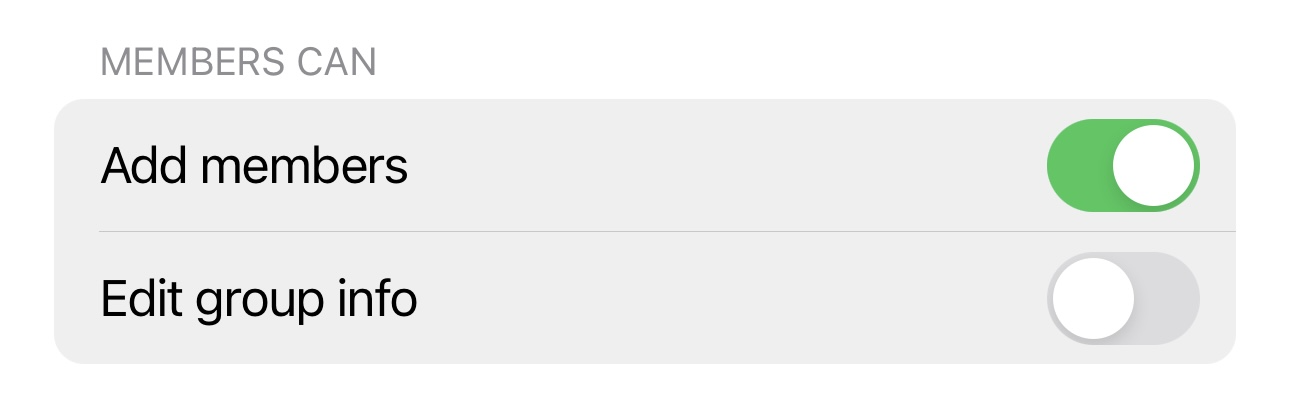
You can use member statuses, options, and permissions to create a custom policy set. The following table represents the valid policy options for each of the permissions:
| Permission | Allow all | Deny all | Admin only | Super admin only |
|---|---|---|---|---|
| Add member | ✅ | ✅ | ✅ | ✅ |
| Remove member | ✅ | ✅ | ✅ | ✅ |
| Add admin | ❌ | ✅ | ✅ | ✅ |
| Remove admin | ❌ | ✅ | ✅ | ✅ |
| Update group permissions | ❌ | ❌ | ❌ | ✅ |
| Update group metadata | ✅ | ✅ | ✅ | ✅ |
If you aren't opinionated and don't set any permissions and options, groups will default to using the delivered All_Members policy set, which applies the following permissions and options:
- Add member - All members
- Remove member - Admin only
- Add admin - Super admin only
- Remove admin - Super admin only
- Update group permissions - Super admin only
- Update group metadata - All members
To learn more about the All_Members and Admin_Only policy sets, see group_permissions.rs in the LibXMTP repo.
Create a group with custom permissions
Beyond the preconfigured ALL_MEMBERS and ADMIN_ONLY permission sets, you can create groups with fully custom permission policies using PermissionPolicySet.
PermissionOption values
When setting custom permissions, use these PermissionOption values:
| Option | Description |
|---|---|
Allow | All members can perform the action |
Deny | No one can perform the action |
Admin | Only admins and super admins can perform the action |
SuperAdmin | Only super admins can perform the action |
Create a group with a custom permission policy set
// Define a custom permission policy set
val customPermissions = PermissionPolicySet(
addMemberPolicy = PermissionOption.Admin,
removeMemberPolicy = PermissionOption.Admin,
addAdminPolicy = PermissionOption.SuperAdmin,
removeAdminPolicy = PermissionOption.SuperAdmin,
updateGroupNamePolicy = PermissionOption.Allow,
updateGroupDescriptionPolicy = PermissionOption.Allow,
updateGroupImagePolicy = PermissionOption.Admin,
updateMessageDisappearingPolicy = PermissionOption.SuperAdmin
)
// Create a group with custom permissions
val group = client.conversations.newGroupCustomPermissions(
inboxIds = listOf(memberInboxId1, memberInboxId2),
permissionPolicySet = customPermissions,
name = "Custom Group",
description = "A group with custom permissions"
)Get the current permission policy set
To retrieve the current permissions for a group:
// Get the current permission policy set for a group
const policySet = await group.permissionPolicySet();
console.log('Add member policy:', policySet.addMemberPolicy);
console.log('Remove member policy:', policySet.removeMemberPolicy);
console.log('Update name policy:', policySet.updateGroupNamePolicy);Update individual permissions
Super admins can update individual permissions on an existing group. Each permission can be updated independently.
Update add member permission
// Allow only admins to add members
await group.updateAddMemberPermission('admin');Update remove member permission
// Allow only admins to remove members
await group.updateRemoveMemberPermission('admin');Update add admin permission
// Only super admins can add admins
await group.updateAddAdminPermission('super_admin');Update remove admin permission
// Only super admins can remove admins
await group.updateRemoveAdminPermission('super_admin');Update group name permission
// Allow all members to update the group name
await group.updateNamePermission('allow');Update group description permission
// Allow only admins to update the description
await group.updateDescriptionPermission('admin');Update group image permission
// Allow only admins to update the group image
await group.updateImageUrlPermission('admin');Manage group chat admins
Check if inbox ID is an admin
const isAdmin = group.isAdmin(inboxId);Check if inbox ID is a super admin
const isSuperAdmin = group.isSuperAdmin(inboxId);List admins
const admins = await group.listAdmins();List super admins
const superAdmins = await group.listSuperAdmins();Add admin status to inbox ID
await group.addAdmin(inboxId);Add super admin status to inbox ID
await group.addSuperAdmin(inboxId);Remove admin status from inbox ID
await group.removeAdmin(inboxId);Remove super admin status from inbox ID
await group.removeSuperAdmin(inboxId);Manage group chat membership
Add members by inbox ID
The maximum group chat size is 250 members.
await group.addMembers([inboxId]);Add members by identity
You can add members using their identities instead of inbox IDs. This method returns a MembershipResult with details about the operation.
// Add members using identities
const result = await group.addMembersByIdentity([memberIdentity1, memberIdentity2]);
// MembershipResult contains:
console.log('Added members:', result.addedMembers); // InboxId[]
console.log('Removed members:', result.removedMembers); // InboxId[]
console.log('Failed installations:', result.failedInstallationIds); // InstallationId[]Remove member by inbox ID
await group.removeMembers([inboxId]);Remove members by identity
// Remove members using identities
await group.removeMembersByIdentity([memberIdentity1, memberIdentity2]);Leave a group
A member can remove themselves from a group by calling leaveGroup(). After leaving, the group becomes inactive for that member.
A member who is the super admin of the group cannot leave the group. By default, the group creator is a super admin.
await group.leaveGroup();
// Sync to update group state
await group.sync();
// Verify the group is now inactive
const isActive = await group.isActive(); // Returns falseCheck if member is pending removal
After a user calls leaveGroup(), you can check if their removal is still being processed using the membershipState() method. This is useful for showing appropriate UI while the group removal is being finalized.
// After calling leaveGroup()
group.leaveGroup()
// Check if removal is still pending
val state = group.membershipState()
if (state == FfiGroupMembershipState.PENDING_REMOVE) {
// User has requested to leave, but removal not yet fully processed
println("Processing your departure from the group")
}The PENDING_REMOVE state indicates that the user has called leaveGroup() but the removal has not yet been fully processed by the client. After syncing and processing completes, the group will become inactive.
Get inbox IDs for members
const inboxId = await client.findInboxIdByIdentities([
bo.identity,
caro.identity,
]);Get members
// sync group first
await group.sync();
// get group members
const members = await group.members();Get the inbox ID that added the current member
const addedByInboxId = group.addedByInboxId;Get peer inbox IDs
Get the inbox IDs of all other participants in a conversation (excluding the current user):
// Get the peer inbox ID in a DM
const peerInboxId = await dm.peerInboxId();Check if current user is the creator
Check if the current user created the conversation:
// Check if current user created the group
val isGroupCreator = group.isCreator()
// Check if current user created the DM
val isDmCreator = dm.isCreator()Get the creator inbox ID
Get the inbox ID of the user who created the conversation:
// Get the creator's inbox ID for a group
const creatorInboxId = await group.creatorInboxId();